Skip to content

California cannabis distribution · method

My method in action.

Phenominal Consulting is a California cannabis distribution compliance practice. The work happens between Metrc, the lab COA, the label generator, and the ERP. That is where structural failures live, and where the regulatory record gets written. The patterns below are the ones I document in the field, organized by where the failure surfaces in the pipeline.

The pattern, in California's own data

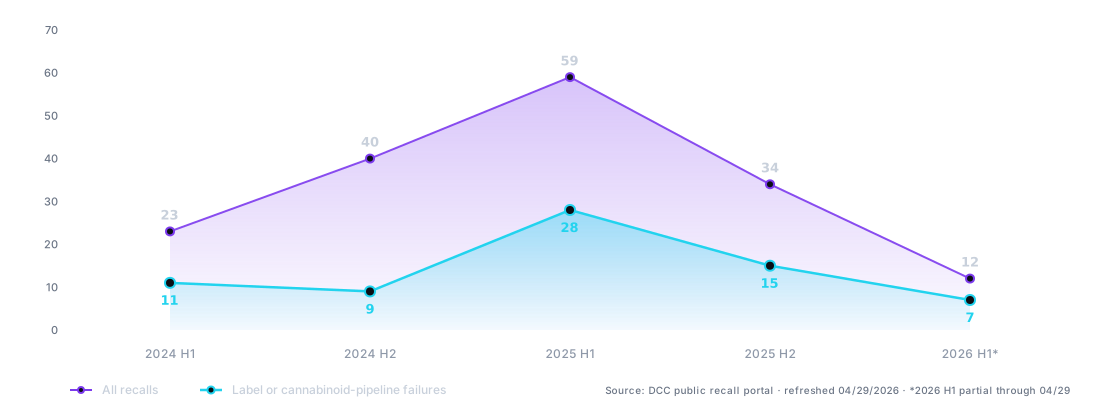
175 California cannabis recalls in 30 months. Roughly 40% trace to a single pattern.

175
Total California cannabis recalls.
DCC recall portal · January 2024 – present · Refreshed daily.
~40%
Cited label or cannabinoid-pipeline failures.
DCC recall reasons coded against published categories.
+95%
Year-over-year growth in label-pipeline recalls (2024 → 2025).
DCC recall counts, calendar-year aggregate.
21
Recalls citing the verbatim phrase ‘Inaccurate Labeling (Cannabinoid inflation).’
DCC recall reason field, exact-string match.

Live data + filters: the recall tracker. Monthly + quarterly snapshots: the reports archive. Methodology + citation: the data page.

The mechanism behind the headline number

‘Inaccurate Labeling (Cannabinoid inflation),’ in plain English.

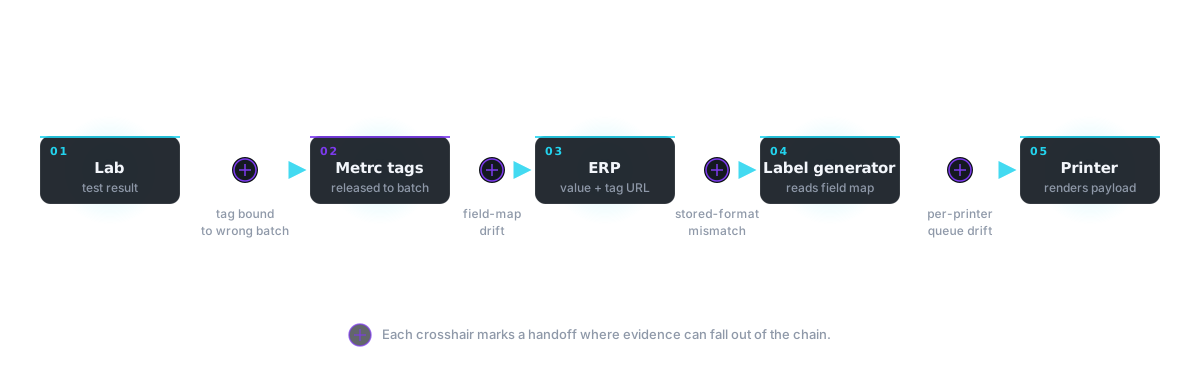
Cannabinoid percentage gets inflated through a data pipeline, not through a single decision. The lab tests the batch and issues a result. Metrc then releases serialized tags against that tested batch. Each tag carries a unique 24-character UID that must be printed on every product unit under 4 CCR § 15048.5(c); if the licensee has opted into Metrc Retail ID, that UID is also encoded into a 1a4.com/X8K4Q-style QR for consumer scanning. The lab result and the tag UID both land in the ERP. The ERP hands the cannabinoid value and the tag UID to a label generator. The label generator builds a payload. The printer renders it onto the package. Somewhere along that chain, the number on the package becomes higher than the number the lab actually measured.

The DCC’s verbatim citation phrase is “Inaccurate Labeling (Cannabinoid inflation).” It does not specify which step in the pipeline failed. From the regulator’s view, the label is the artifact and the artifact is wrong. The investigation falls on the licensee whose name is on it.

If any of those handoffs is stale, mismapped, or out of order, the label and the lab no longer agree. The label is what the regulator photographs. That is what counts.

A deeper walkthrough of the substitution mechanism: the math, the pipeline failure surfaces, and what to check in your own labels →

Why no vendor solves this

Each vendor in your stack is responsible for their own product surface. Your lab vendor is responsible for the test result they hand you. Your ERP vendor is responsible for the records you put in their system. Your label vendor is responsible for rendering the payload they receive. Your printer vendor is responsible for putting ink on substrate. Your Metrc integrator is responsible for syncing what your system tells it to sync.

None of them are responsible for the gaps between their products, and none of them have commercial incentive to be. Fixing a cross-vendor gap means expanding your support burden into systems you don’t control. So the gaps stay open, and operators absorb the cost when something falls through.

The fix requires an independent operator with cross-vendor visibility and no surface to defend. That is the work below.

Cannabis distribution integration failures

Integration handoffs that look healthy.

A vendor-side checklist passing is not the same as a system that has actually carried a workload end-to-end. Each of these patterns lives between two correctly-deployed components.

The integration was deployed. Vendor checklist all green.

BarTender registered, license valid, printers visible. The vendor's deployment had been signed off. The integration was pointing at the wrong port. Acumatica's dispatches were never reaching BarTender's listener. The system was nominally “up” and had never carried a single label at production rate.

How it surfaced. End-to-end walkthrough of the Acumatica → BarTender → DataFlex chain in production.

How it got fixed. Corrected the integration's port number. Communication restored the same day.

E1000 'print signal sent too close together' was being chased through Videojet support as a printer-side error.

The conveyor belt speed had been adjusted at some point. The laser detection timing had not been adjusted to match. The laser was firing at the old belt rate, packing print signals too close on the new belt rate. The error code looked like a printer fault and had been treated as one for months.

How it surfaced. Walking the production line and tying the error to the belt-laser timing relationship instead of the printer.

How it got fixed. The operator adjusted laser detection timing on the spot. Resolved the same day.

A live label dispatch worked broadly. One specific PO suddenly wouldn't dispatch.

Acumatica's State Compliance Preferences are registered per inventory ID, not per template. A new product had to be explicitly added even though the template had been used successfully on prior products. Without the entry, dispatch silently fails for that product. Standard troubleshooting (port, server, printer connectivity) finds nothing.

How it surfaced. Running the standard troubleshooting checklist with one extra check: State Compliance Preferences.

How it got fixed. Added the new inventory ID to State Compliance Preferences. Dispatch immediately resumed. Added to the troubleshooting SOP as the first low-effort check before investigating port, server, or connectivity.

Cannabis label printer config & vendor licensing

License-tier and vendor-config landmines.

Every vendor has a behavior that's documented somewhere, undocumented in the place an operator would look, and load-bearing for production. These are the recurring ones I document.

Some print runs completed. Some died at 'communication error' or 'print limit exceeded.' Failures appeared random.

BarTender Pro's per-job database is SQL Express with a 1024 MB ceiling. Default verbose logging was consuming around 90% of that ceiling before label data even started loading. Larger runs hit the wall first. Failures looked random; the cause was a license-tier limit no one had noticed because no one had built a run that large under the new pipeline.

How it surfaced. Tracing the 8,000-label failure pattern back to a database-size constraint after disk space and RAM had each been ruled out.

How it got fixed. Disabled verbose logging and added RAM. Improvement was marginal. That was diagnostic value: the bottleneck wasn't on the print server at all.

Driver upgrades on two printers went through. The printers still appeared in BarTender.

Each BarTender driver update registered the printer as a new instance, consuming an additional license slot. The 6-slot license was instantly exhausted across six already-licensed printers. Zero headroom. No warning was issued by the product. The trap survives whatever fix the vendor applies on the backend, because the underlying behavior is unchanged.

How it surfaced. Production hung the next time the printers tried to dispatch. Called BarTender support.

How it got fixed. Vendor support deduplicated the entries on the backend and refreshed the license. Subsequent driver upgrades pre-notified the vendor and coordinated the refresh in advance. No exhaustion.

Brand-new 2×1" labels were rendering as 1×2" portrait. Orientation toggles in driver and printer preferences had no effect.

One printer in the fleet is a jar labeler. Its printhead is perpendicular to the floor rather than parallel like every other printer. The driver ignores landscape and portrait toggles entirely; only raw stock dimensions matter. Nothing in the printer's documentation says this. The fix is one config change. Finding the fix requires getting up from the desk.

How it surfaced. Multiple orientation-toggle attempts failed. Physically inspected the printhead orientation.

How it got fixed. Configured stock as 1×2" (swapped) for a 2×1" label design. SOP written: always swap width and height when configuring stock for this printer.

Cannabis label pipeline architecture

The architectural failures that look like operational ones.

The bottleneck a floor blames is rarely the bottleneck. These are the failures that hid behind plausible-but-wrong explanations for weeks until the math forced the issue.

Disk space had been blamed. SQL Express had been blamed. The hosting server had been blamed. Acumatica throttling, verbose logging, RAM. Each fix landed; each was tried.

The Acumatica-to-BarTender integration sent one HTTP request per label. A 5,000-label job became 5,000 sequential HTTP round trips with full TCP setup, headers, payload, and response wait between each. The 16–17 labels-per-minute ceiling that had been observed every day on the floor was the exact mathematical product of round-trip time and request count. Every prior fix had been correct in scope and irrelevant to the bottleneck.

How it surfaced. Doing the arithmetic on the actual workload: 5,000 labels × ~3.5 sec round trip, sequential, equals 16–17 per minute exactly.

How it got fixed. Bypassed the middleware. A Chrome extension talking ZPL directly to the printers over LAN. BarTender and the hosted server out of the critical path.

Whenever the printers were spooling, Acumatica was reported as running slow. Strong intuitive explanation; blame went to the printer pipeline by default.

The correlation between spooling and Acumatica slowness was confirmation bias, not causation. Spooling was never restarted between the two phases of the test. The team's experience of Acumatica speed tracked their belief about whether spooling was happening, not whether it actually was. Without the blind test, the wrong system would have continued to be blamed indefinitely.

How it surfaced. Ran a controlled blind test. Phase one: spooling stopped, team aware, team reported Acumatica "a bit faster." Phase two: spooling still stopped, team unaware, team reported Acumatica had "slowed down again" and attributed it to spooling.

How it got fixed. Documented the test, shared with operations. Spooling formally ruled out as the Acumatica perf cause. The root-cause analysis became defensible, and the cross-vendor conversation stopped wasting time on the false trail.

One printer was throwing intermittent 'Job Update Failure' errors at high throughput. A neighboring printer in the same fleet ran cleanly under identical conditions.

The failing printer's CLARiTY Imaging/JobUpdateQueue was set to 1 (factory default). The healthy printer's was 20, tuned during earlier firmware work but never propagated. Queue depth of 1 means the printer can hold exactly one pending image swap. At fast throughput the next label's image arrives before the current one clears the buffer, firmware rejects, error surfaces. This is per-printer drift: a setting that was correctly changed on one printer and not the others.

How it surfaced. Compared the two printers' running CLARiTY config side-by-side. One value differed.

How it got fixed. Bumped the queue depth to match the tuned printer. Error stopped instantly. Prompts a fleet-wide config audit; uniform drift on a different setting often surfaces in the same pass (see below).

Per-printer config diffs across the fleet showed no drift on the relevant setting.

All four printers had RecordBufferMaximum at the factory default of 1000. The schema allows up to 10,000, ten times larger. The diff didn't catch it initially because it was uniform drift away from optimal, not per-printer drift. A previous 14,000-label run that had stalled three times was very likely hitting this ceiling silently. A diff between identical wrong values is, definitionally, blank.

How it surfaced. Reading the CLARiTY schema documentation for unrelated reasons and noticing the recommended-max vs. installed-default gap.

How it got fixed. Bumped fleet-wide to 10,000. Folded into a new fleet-config baseline tool that compares current values against schema-recommended-max, not just printer A vs. printer B.

Hardware, network & reporting-layer failures

Things that look like software bugs and aren't.

Half the failures I find are physical. Re-seat-power-first is the first item on the printer troubleshooting flow. The other half are reporting layers lying about hardware state. Both are easy to miss from a desk.

A normally-fast printer was queuing labels extremely slowly. Power cycle via the printer's web UI was unresponsive.

The power cable was loose at the back of the printer. A marginal connection produces a degraded firmware state: enough voltage to stay nominally “on” and accept jobs, not enough to operate the image buffer and network stack at normal speed. The soft power cycle was unresponsive because the controller wasn't getting clean power to begin with. Diagnosis required physical hands on the printer.

How it surfaced. Physically inspected the printer after the soft power cycle attempt failed.

How it got fixed. Re-seated the power cable. Re-seated ethernet as a precaution. Returned to normal queuing speed immediately. Zero software change. Folded into SOP: re-seat power and ethernet is now step one of the printer troubleshooting flowchart for the operators.

A laptop reported 16 GB installed in Windows but only 8 GB usable; high memory pressure on the visible 8 GB. Off-the-shelf hypothesis: failing RAM stick.

Visual inspection showed only one 8 GB stick physically present. The other slot was empty. The remaining stick had a sticker reading “16GB x2”, an obvious-at-a-glance suggestion to anyone who didn't open the laptop. The OEM firmware kept reporting the as-shipped 16 GB configuration. Windows trusted firmware for the “installed memory” string while reporting the actually-usable 8 GB. There was no failing stick. There was a missing one.

How it surfaced. Opened the chassis to do the planned RAM swap.

How it got fixed. Pivoted to software cleanup on the existing 8 GB after the replacement stick from Best Buy turned out to be incompatible. Operator confirmed substantial responsiveness improvement.

An operator's laptop oscillated between 0 Kbps and ~180 Kbps on WiFi. Two laptops within feet of him on the same network were clean at 4–6 Mbps. Hardwired ethernet showed identical oscillation, appearing to rule out the access point and isolate failure to his machine.

The laptop was on a different WiFi network entirely than the rest of the warehouse staff. The ethernet test was matched to a port that put it on the same misrouted segment, which is why hardwired performance looked identical to wireless. Two correctly-functioning network paths can produce identical bad results when both lead to the wrong endpoint.

How it surfaced. Installed a USB WiFi adapter to test the failing-card hypothesis. While doing so, noticed the listed network was different from his neighbors'.

How it got fixed. Connected to the correct network. 100/70 Mbps clean and sustained. Network card was fine. The USB adapter purchase bought the diagnosis even though the hardware-replacement hypothesis was wrong.

A printer firmware update kept failing. Vendor support's diagnosis pointed at a faulty SD card.

The DataFlex 6330 has no SD card. It uses onboard memory only. The vendor's diagnosis was likely templated from a different DataFlex variant or a generic Videojet response. Following the diagnosis would have produced no progress; trusting it would have produced months of stalled tickets. The fix was to physically open the hardware and verify what was actually inside it.

How it surfaced. Disassembled, inspected, and cleaned a spare unit (not in production).

How it got fixed. The spare upgraded to current firmware without issue. Confirmed the production unit could be upgraded the same way. Both now match the rest of the fleet.

Common questions

Failures the floor blames on the wrong system.

Why does Acumatica run slow when label printers are spooling?
Usually it doesn’t. The correlation is almost always confirmation bias. The team’s perception of Acumatica speed tracks their belief about whether spooling is happening, not whether it actually is. A blind test (stop spooling without telling the operators) rules it out. Real Acumatica slowness during label runs is more often the per-label HTTP round-trip pattern in the integration, not spooling load.
What causes BarTender to fail on large label runs?
BarTender Pro’s per-job database is SQL Express, which has a 1024 MB ceiling. Default verbose logging consumes around 90% of that ceiling before label data starts loading, so larger runs hit the wall first and failures look random. Disabling verbose logging buys some headroom. The real fix is moving the bottleneck off BarTender entirely for high-volume runs.
Why does the same printer driver upgrade exhaust a BarTender license?
Each BarTender driver update registers the printer as a new instance and consumes an additional license slot. Six already-licensed printers can instantly exhaust a 6-slot license with no warning from the product. The trap survives any vendor-side fix because the underlying behavior is unchanged; the only durable mitigation is pre-notifying the vendor before driver upgrades and coordinating a license refresh in advance.
What does a Videojet “print signal sent too close together” (E1000) error usually mean?
Most often, belt speed and laser detection timing are out of sync, not a printer fault. The conveyor speed gets adjusted at some point. The laser timing doesn’t get adjusted to match. The laser fires at the old rate and packs print signals too close on the new rate. The error code looks like a printer issue and gets routed to printer support for months. The fix is at the laser, not the printer.
How do you tell a vendor configuration problem from a hardware failure?
Vendor diagnoses are templated. They map symptoms to the most common cause across a vendor’s entire install base, not to your specific unit. The way to disconfirm one is to physically inspect the hardware before ordering parts. Example: a vendor pointed at a faulty SD card on a printer model that has no SD card. Following the diagnosis would have produced no progress. Opening the unit took fifteen minutes.

The patterns above, walked end-to-end on one engagement

The case studies above are typed up as patterns. The work itself is sequential: which failure surfaces first, what gets traced before what, when waiting on a vendor stops being the right call and you build the bypass. The LBS Distribution engagement (March through April 2026) is the reference case where that sequence is documented end-to-end with dates, outcomes, and deliverables.

Read the full LBS engagement →

If three of those felt familiar, that is the conversation.

Thirty minutes. No slides. We'll talk through which patterns you're seeing and whether the gap belongs to a vendor or to me.